
Forehead: Difference between revisions
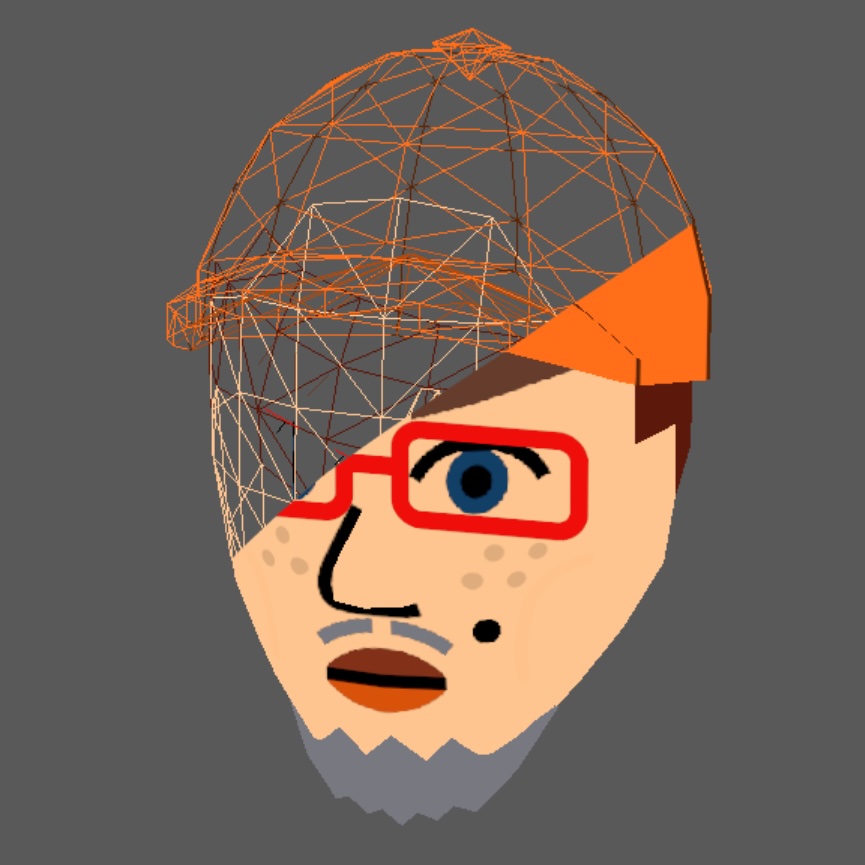
Created page with "thumb|The forehead of the face, highlighted in blue. The [[Hat|hat is made transparent in order to show the underlying forehead.]] In Mii rendering, the forehead is part of the face, and serves to bridge the gap between the faceline and the hair. The forehead is only a model, and has a single skin color projected over the surface instead of a texture. {{Render-Navbox}} Category:Face part" |
modulation |
||
| Line 1: | Line 1: | ||
[[File:mii_forehead_(GHOST_CAP).png|thumb|The forehead of the face, highlighted in blue. The [[Hat|hat]] is made transparent in order to show the underlying forehead.]] | [[File:mii_forehead_(GHOST_CAP).png|thumb|The forehead of the face, highlighted in blue. The [[Hat|hat]] is made transparent in order to show the underlying forehead.]] | ||
In [[Mii rendering]], the forehead is part of the [[face]], and serves to bridge the gap between the [[faceline]] and the [[hair]] | In [[Mii rendering]], the forehead is part of the [[face]], and serves to bridge the gap between the [[faceline]] and the [[hair]]. | ||
{{Render-Navbox}} | == Modulation == | ||
As no input texture is involved, the texture uses the [[Color Modulation#Constant|Constant]] strategy in [[Color Modulation]]. ColorR is determined by faceline_color. in [[Cafe Face Library|FFL]], this is a [[Faceline Color Table|Faceline Color]], and in [[nn::mii]] this is a [[Common Color Table|Common Color]].{{Render-Navbox}} | |||
[[Category:Face part]] | [[Category:Face part]] | ||
Revision as of 08:53, 24 September 2025
.png)
In Mii rendering, the forehead is part of the face, and serves to bridge the gap between the faceline and the hair.
Modulation
As no input texture is involved, the texture uses the Constant strategy in Color Modulation. ColorR is determined by faceline_color. in FFL, this is a Faceline Color, and in nn::mii this is a Common Color.