
Cap: Difference between revisions
No edit summary |
|||
| Line 1: | Line 1: | ||
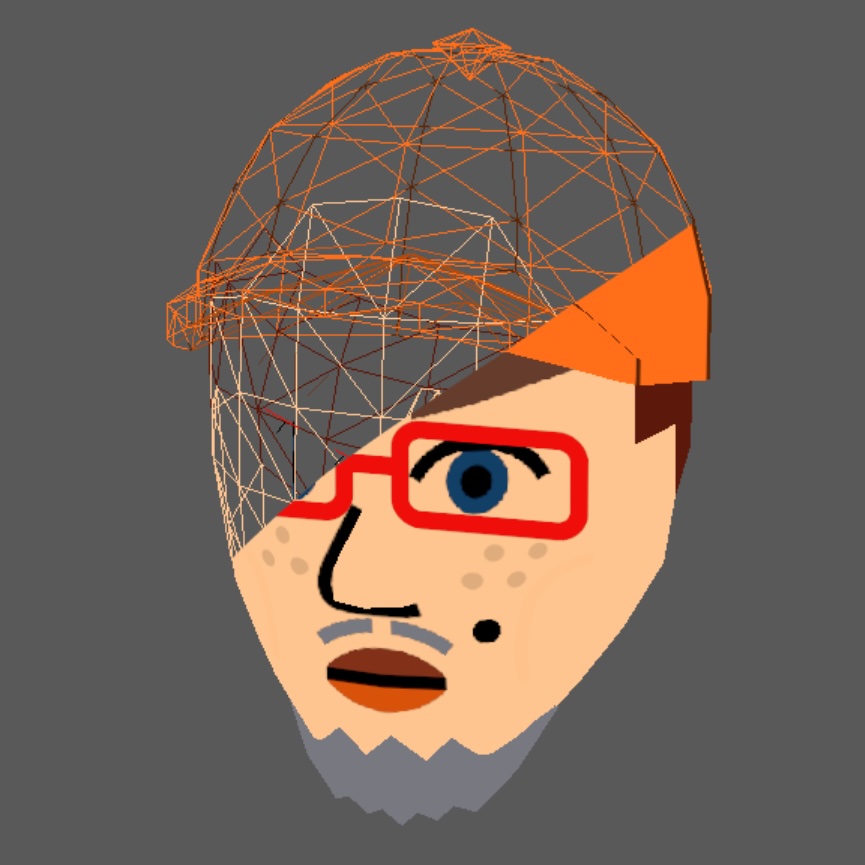
[[File:Mii_hat.png|thumb|The cap of the face, highlighted in blue.]] | [[File:Mii_hat.png|thumb|The cap of the face, highlighted in blue.]] | ||
In [[Mii rendering]], the cap (''aka.'' Hat) is part of the face. The '''cap model''' can be added depending on the [[hair type]], and a texture is projected onto it. The '''cap texture''' is based on one texture that is stretched and repeated. | In [[Mii rendering]], the cap (''aka.'' Hat) is part of the face. The '''cap model''' can be added depending on the [[hair type]], and a texture is projected onto it. The '''cap texture''' is based on one texture that is stretched and repeated. | ||
== Texture == | == Texture == | ||
The texture contains the R color channel and is [[Color Modulation|modulated]] with the [[Color Modulation#Alpha Opaque|''Alpha Opaque'']] strategy. In modulation, ''ColorR'' is determined by the ''favorite_color'' field. This is always a [[Favorite Color Table|Favorite Color]].<gallery> | The texture contains the R color channel and is [[Color Modulation|modulated]] with the [[Color Modulation#Alpha Opaque|''Alpha Opaque'']] strategy. In modulation, ''ColorR'' is determined by the ''favorite_color'' field. This is always a [[Favorite Color Table|Favorite Color]].<gallery> | ||
Latest revision as of 10:02, 24 September 2025

In Mii rendering, the cap (aka. Hat) is part of the face. The cap model can be added depending on the hair type, and a texture is projected onto it. The cap texture is based on one texture that is stretched and repeated.
Texture
[edit | edit source]The texture contains the R color channel and is modulated with the Alpha Opaque strategy. In modulation, ColorR is determined by the favorite_color field. This is always a Favorite Color.
-
 Before modulation.
 -
 After modulation.

